DepartmentsStaffStudentsActivitiesResources
homesearchsite map

Norris School District


Home > PowerSchool

FROM HOME:

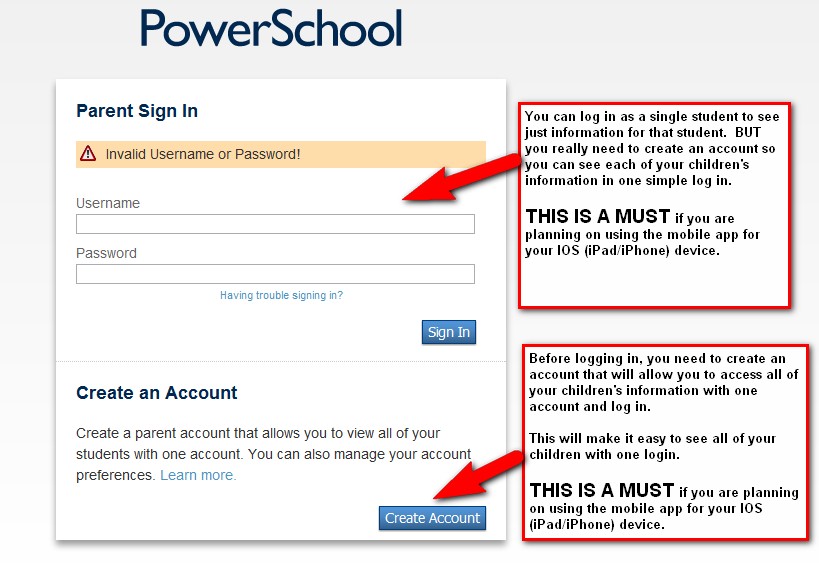
Student and Parent Login  (Parents make sure you setup an account! Directions below.)
Parent help page
FAQ's
Teacher Login  (Do not use this from school!)
Teacher Java for grade book from home
Admin Log in  (Do not use this from school!)


Now Available! 


Two new apps are now available in the Apple iTunes® App Store:PowerSchool for Parents and PowerSchool for Students.

These new apps will allow parents and students to access all the same information they would normally access from a browser, but with the ease and convenience of an app installed on their Apple mobile device.

Facebook and Twitter integrationautomatic login, a family overview, simplified "one-thumb" browsing, and other features make accessing PowerSchool on the go faster and easier than ever before. 

The apps are FREE and available for download from the iTunes store. Version 1.0 of the apps will be supported on any Apple iPod Touch, iPhone, and iPad running iOS version 4.0 or higher.

Click here to download the PowerSchool Parent app. Click here to download the PowerSchool Student app.


Once you have down loaded the Apps, you will need to setup the correct server and port.  That information is shown in the graphic below.  Make sure you setup a parent account for the parent app. Those directions are below.


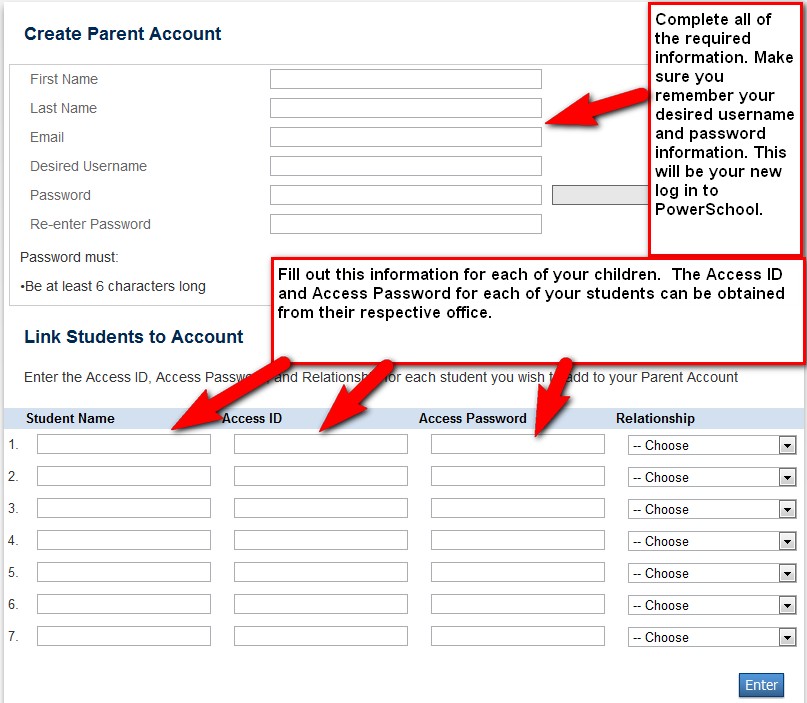
Parent Account Setup

The Access ID and Access Password are parent logins for each of your students. As noted above, these are available in the offices.